
The AI assistant
The Perfony assistant answers your questions about using Perfony: how to create a meeting, archive a folder, manage several folders at once… It relies on the articles of the Perfony academy and gives you, under each answer, the links to the articles it used.
Before you start
- The assistant must be enabled by the administrator of your instance (Third-party software: artificial intelligence card of the company settings, see Setting up artificial intelligence). Otherwise the bubble does not appear.
- Nothing to install: the assistant is in Perfony, on a computer as on a phone.
Open the assistant
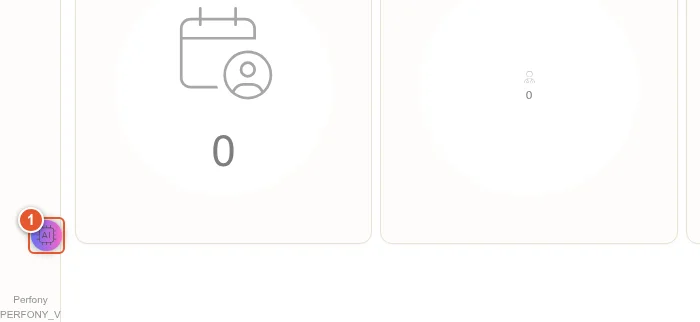
- Click the bubble at the bottom left of the screen.
Ask a question
- Type your question in the input area, then press Enter (or the send button). While the answer is being written, three animated dots are shown.
- Under the answer, the References: list links to the academy articles used. Click a title to open the full article.
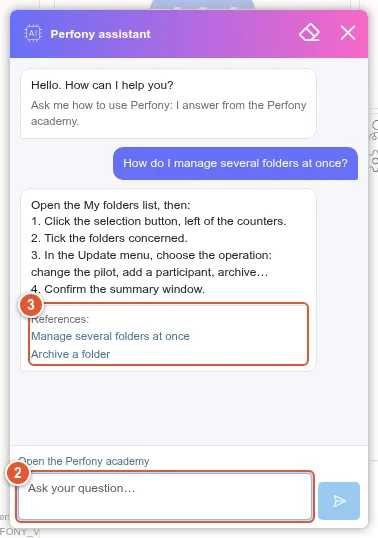
You can ask a follow-up question (“And to archive them?”): the assistant takes the current conversation into account.
Good to know
- The assistant answers in the language of your question, and searches first the academy of your interface language. When it has no useful article, it relies on the English academy.
- It only answers questions about using Perfony. For an unrelated question, it says so and points you to the academy.
- It does not read your folders, meetings or actions: it explains how to do things, it does not do them for you. To act on your data in plain language, use the Perfony connector for Claude.
- The eraser clears the conversation; the cross reduces the window to the bubble. The Open the Perfony academy link leads to the full academy.
- The assistant has a monthly quota of its own for your organization. When it is reached, a message says so until the next month.
- If the assistant is “temporarily unavailable”, try again in a few minutes.