How can we help?
Audit function settings
-
Set audit parameters on actions
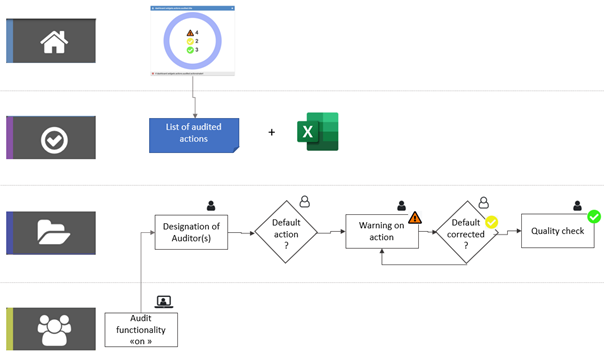
With a view to continuous improvement and operational excellence, it is possible to set up a notion of action audit.
This feature enables an audit flow to be set up between auditors and auditees.
- An Executive license is required to add/remove the auditor role from a user,
- To be an auditor, you need to have at least a pilot’s license and be a pilot or alternate pilot on a dossier,
- An Executive license will enable you to be a participant in a file and an auditor.
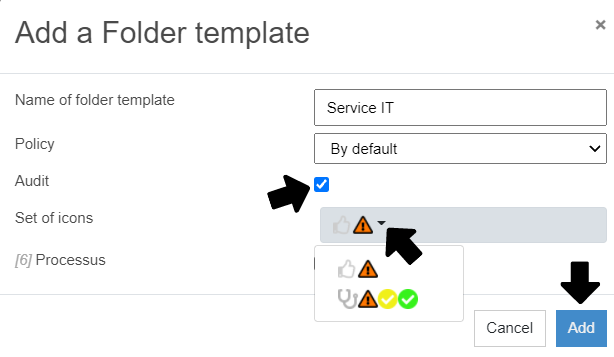
When you activate this feature, you have the option of activating one or more pictograms, depending on the type of audit you’re interested in. By default, 3 pictograms are integrated:
 This pictogram indicates a point of vigilance. A risk/defect has been reported/observed.
 This pictogram indicates that the requested correction has been made by the auditee and is awaiting validation by the auditor.
 This pictogram means that the correction has been validated, and the audit has been successfully completed.
PS: the icon set can be customized on request: support@perfony.com
-
Auditor settings in folders
In the “My folders” menu, an “auditor” button appears for each user present in the folder in the “Participants” tab:
- All pilots and alternate pilots in the file, as well as a participant with an executive license, may be auditors.
- Can be audited, all persons in the file and responsible for an action.

-
Set up the export of audited actions via an API
The audited actions can be exported. For further information and help with implementation, please contact: support@perfony.com