
Your password
Because your Perfony account is personal, it is password protected.
It was emailed to you when you created your account. We invite you to modify this initial password as of your first visit to increase security.
Forgotten password
If you do not remember your password, click on the link at the bottom of the login form to create a new one.
You will need to fill in your email address and go to your mailbox to make the change. If you do not receive an email from us in the next minute, remember to check in your spam box.
If you have any problems, don’t forget that you can contact us on contact@perfony.com and we will be happy to take you through the password regeneration procedure.
Changing your password
There are two ways to access the password change page:
- Click on your avatar, then choose “change my password” from the drop-down menu.
- Click on your avatar, then choose “User Information” from the drop-down menu. Finally, click on the “change my password” button below the email address.
Remember to save before leaving the page.
Expired password
When your organisation has set a password lifetime, a password that is too old must be changed. This rule applies everywhere the Perfony password is used: the login page, the mobile app, the Outlook add-in and Teams, and even a session already open, which is closed when the password expires.
The password lifetime is set by the administrator in the company preferences.
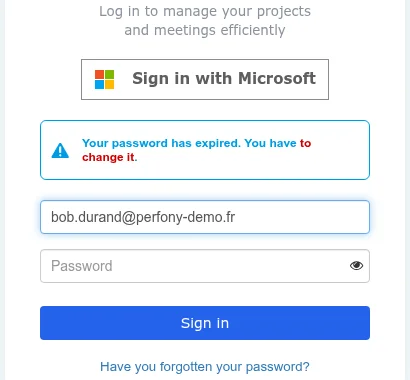
At login, a user whose password has expired is stopped by the message Your password has expired. You have to change it. They must go through Have you forgotten your password? to choose a new one. A session opened before the expiry is closed when it expires, with the same message.
Video hosted on YouTube, shown once you accept cookies.