
Working on your actions and folders with Claude
With the Perfony connector for Claude (claude.ai), you ask in plain language for what you would usually do in Perfony, and Claude does it for you. Claude does not only read your projects: it works in your folders.
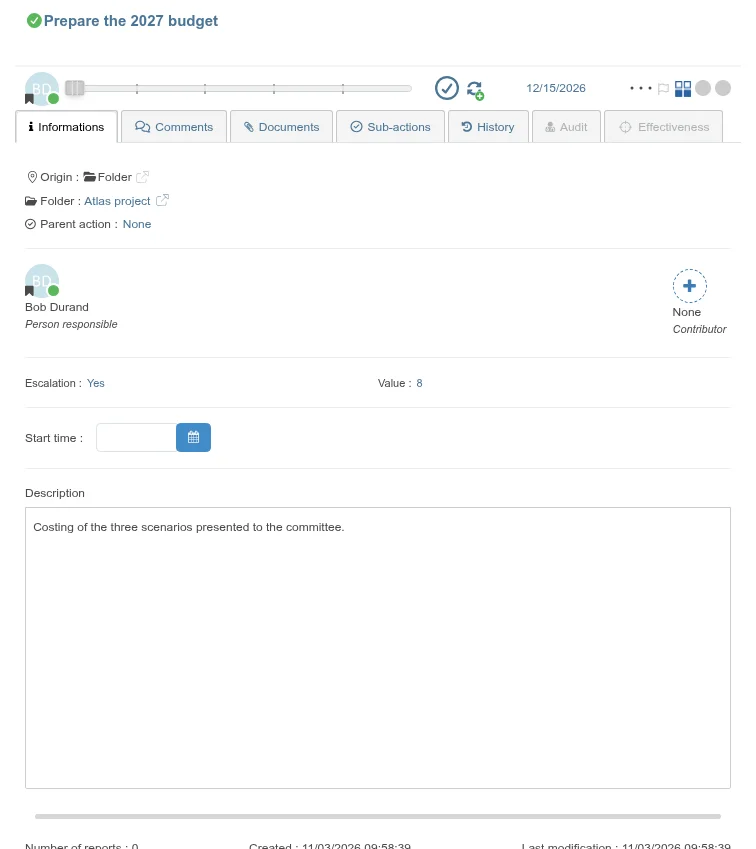
- “In the Atlas project, create the action Prepare the 2027 budget, for Bob Durand, priority 3, due on 15 December, Escalation yes, Value 8.” Claude creates the action in the folder, with its stakeholder, priority, duration, due date, description and custom fields.
- “Add the sub-action Book the room to Prepare the 2027 budget.” Claude creates a sub-action under the action, in the same folder.
- “Move this action to the Steering committee sub-folder.” Claude moves the action to another folder, with its sub-actions, or places it under another action.
- “What are the open actions of the Atlas project for Bob, due before the end of November?” Claude lists the actions of the folder by the requested status, stakeholder and due date. If there are many, it gives them page by page.
- “Which folder is action 6203 in?” Claude gives the folder, its full path if it is a sub-folder, and the originating meeting if the action was created in a meeting.
- “Which custom fields does the Atlas project have?”, “Set the Value of this action to 12.” Claude reads and updates custom fields while respecting the allowed values.
- “Which of my folders contain Atlas?” Claude lists your folders with their path and your role.
- “Read the attachments of action 6203.” Claude reads the documents attached to an action: text, PDF and screenshots, up to 5 MB. For other documents (Word, Excel…) or those stored on OneDrive, it gives you their link.
- “Give this action to Bob.”, “Add Carole as a contributor.” Claude finds the person by name or department, then changes the stakeholder or adds a contributor.
- “During tomorrow’s meeting: create the action Send the quote, decided in committee.” Claude creates the action from the meeting: the meeting is its origin and it goes into the meeting’s folder. It can also update the actions of the meeting’s action plan with your rights as a participant of the meeting.
- “Push back all my open actions of the Atlas project to 1 March.” Claude applies the same change to several actions and tells you, action by action, what was done.
Before you start
- The connector must be enabled for your company and connected in Claude: see Connect Claude to your Perfony account and Preparing for meetings with Claude.
- If Claude does not know these new requests yet, remove the connector in Claude and add it again: Claude then refreshes the list of possible requests.
Creating an action in a folder
- In Claude, ask for the creation and name the folder, for example: “In the Atlas project, create the action Prepare the 2027 budget, for Bob Durand, priority 3, due on 15 December, Escalation yes, Value 8.”
- If several folders have a similar name, Claude asks you which one. If a mandatory field of the folder is missing, or a value is not allowed, it tells you and suggests the possible values.
- Claude creates the action and gives you its link. In Perfony, it appears in the folder as if you had created it yourself:
Moving an action
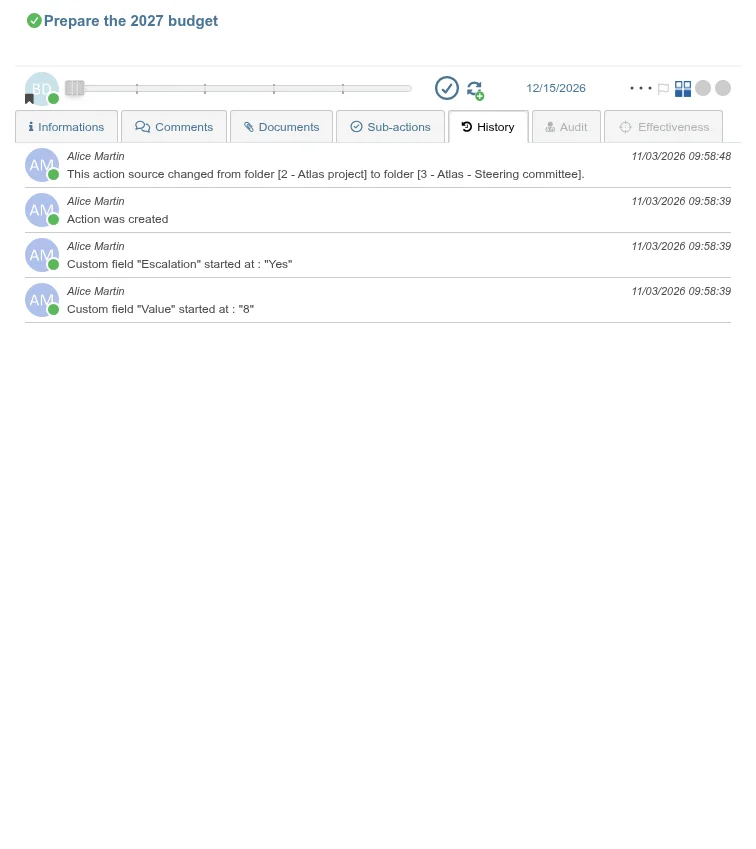
- Ask for the move: “Move Prepare the 2027 budget to the Steering committee sub-folder.”
- If the stakeholder of a moved action is not a participant of the destination folder, Claude warns you before moving: as in Perfony, the action would lose its stakeholder. First add the stakeholder to the folder, or confirm the move.
- The move is recorded in the action’s history, under your name, with the old and the new folder:
Good to know
- Claude acts with your rights: it only creates, updates and moves what you could do in Perfony. A folder you have no access to is never named, and a parent folder you cannot see appears as “…” in paths.
- The stakeholder of an action created by Claude must already be a participant of the folder. Otherwise, add them to the folder in Perfony.
- An action created without naming a folder goes into your to-do list.
- A sub-action moved to another folder must be attached to an action of that folder, or become an action of its own: Claude asks you which you prefer.
- As in Perfony, an action that changes folder loses the custom fields the new folder does not have, as well as its links to other actions.
- Claude can write the description with formatting: headings, lists, links.
- Before changing several actions at once, Claude shows you the list and waits for your approval.
- From a meeting, Claude can only write if the meeting is upcoming or in progress, and only on the actions of its action plan.