
How can we help?
Manage Multiple Users at Once
What is it used for?
During a reorganization or deployment, the administrator updates the information for dozens of users all at once:
- country (and thus time zone), department, and login homepage;
- Pilot, Executive, and Administrator permissions, or license depending on your contract;
- deactivation, reactivation, and deletion;
- resetting two-factor authentication.
Before you begin
- This feature is available only to instance administrators.
- You cannot perform bulk edits on your own account.
- A selection is limited to 200 users.
Select users
- Open the Users menu.
- Click the button to the left of the colored bar to enter selection mode, or hover your mouse over a user’s avatar: a checkbox appears in its place.
- Check the boxes next to the users. The right-hand pane changes to “Selection” and displays the number of users selected.
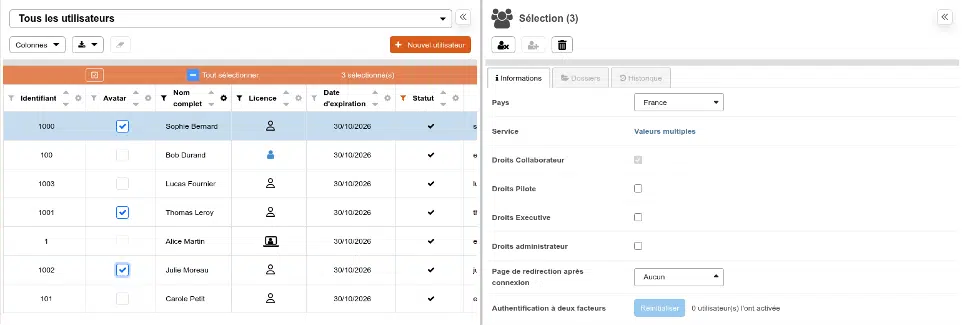
The pane displays the value shared by the selected users, or ” Multiple Values ” when they differ. A partially checked permission box means that only some of the users have that permission.
Edit
- Change the value in the pane: select a country, enter the department, check or uncheck a permission…
- A confirmation message displays the change and the number of users affected. Confirm.
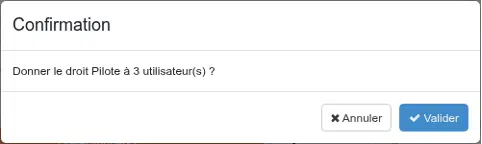
The buttons at the top of the pane deactivate, reactivate, or delete the selected users.
Good to Know
- Permissions are linked: granting the “Executive” permission also grants the “Driver” permission; revoking the “Driver” permission also revokes the “Executive” and “Administrator” permissions. The confirmation message specifies this.
- When it comes to licenses, Perfony verifies that there are enough remaining before making any changes.
- Each change is recorded in each user’s history, just like a change made to their profile.
- Deletion is permanent and requires enhanced confirmation. To suspend access, use deactivation instead.
The “Folders” and “History” tabs are not available when selecting multiple users.