
How can we help?
Manage Multiple Folders at Once
What is it used for?
Reorganizing a project portfolio no longer requires opening each file one by one. You can select multiple files and apply the same action to them:
- change the parent folder;
- change the driver;
- add a participant;
- archive;
- delete (folders go to the Recycle Bin);
- reopen, from the Archived Folders or the Recycle Bin.
Before You Begin
- Bulk management is available only to executive users.
- Permissions are checked on a per-folder basis: a folder you do not have permission to modify will not be changed, and the result will indicate this.
- A single operation can affect up to 200 files.
Select folders
- Open ” My Folders.”
- Hover your mouse over a folder’s icon: a checkbox appears in its place. Check it. The list switches to selection mode, and a checkbox appears in front of each folder.
- Check the other folders. The blue bar shows the number of selected folders; the “Select All” checkbox selects all displayed folders.
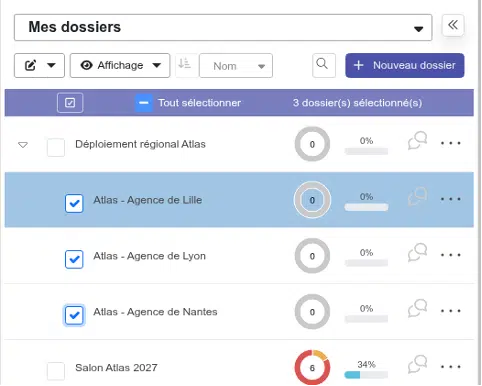
The button to the left of the blue bar also enters or exits selection mode. The Esc key clears the selection.
Apply an Operation
- Click the Update button (pencil) at the top of the list and choose the operation.

- Fill in the window: for example, to change a driver, enter the name of the new driver. The summary at the bottom of the window explains what will happen.

- Click “Confirm.” The result shows the number of files that were updated and lists the ones that could not be updated, along with the reason.

Good to Know
- Change the pilot: The former pilot of each flight becomes the co-pilot. The new pilot must hold a pilot’s license.
- Add a participant: A user who is already in a folder is ignored for that folder.
- Changing the parent folder: The selected folders and their subfolders are not offered as destinations. A subfolder selected along with its parent follows its parent.
- Archive: Ongoing tasks are marked as completed. If a folder contains subfolders that you haven’t checked, the archive operation will fail: either check those as well, or move them first.
- Delete: Folders are moved to the Recycle Bin; see the article “Recovering a Deleted Folder: The Recycle Bin.”