
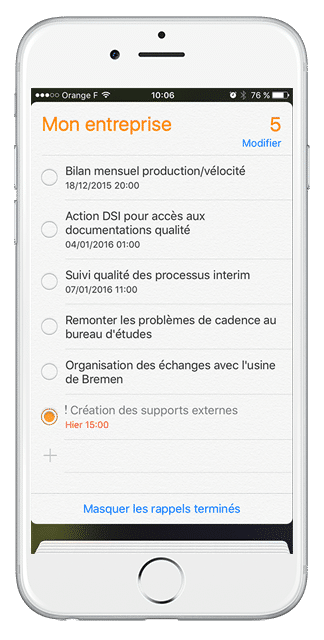
When you need to know your availability to accept an appointment, you may not have your computer at hand…
So how do you know if you don’t have a meeting scheduled at that time?
You are in the workshop and you want to declare that one of your actions is finished and there again, there is perhaps no computer accessible…
Thanks to a small setting on your iPhone, you will be able to add your iPerfony meetings in your “calendar” and your actions in your “reminder” application

The attached PDF guide takes you through the 7 steps of the setup process.
You don’t have an iPhone but you use an Android system or a BlackBerry? Follow our news to find very soon the other detailed sheets of parameter setting!
More tips?

[/divienhancer_carouselchild][divienhancer_carouselchild identifier=”Astuce Perfony : comment “copier/coller” des actions ?” _builder_version=”4.6.6″ _module_preset=”default” use_background_color_gradient=”on” width=”100%” max_width=”25%” custom_margin=”0px|18px||0px|false|false” link_option_url=”https://www.perfony.com/fr/astuce-perfony-comment-copier-coller-des-actions/” border_radii=”on|5px|5px|5px|5px” box_shadow_style=”preset2″ box_shadow_horizontal=”10px” box_shadow_vertical=”4px” box_shadow_blur=”4px”]

[/divienhancer_carouselchild][divienhancer_carouselchild identifier=”Astuce Perfony : peut-on réouvrir des actions clôturées ou des dossiers archivés ou supprimés ?” _builder_version=”4.6.6″ _module_preset=”default” use_background_color_gradient=”on” width=”100%” max_width=”25%” custom_margin=”0px|18px||0px|false|false” link_option_url=”https://www.perfony.com/fr/astuce-perfony-peut-on-reouvrir-des-actions-cloturees-ou-des-dossiers-archives-ou-supprimes/” border_radii=”on|5px|5px|5px|5px” box_shadow_style=”preset2″ box_shadow_horizontal=”10px” box_shadow_vertical=”4px” box_shadow_blur=”4px”]

[/divienhancer_carouselchild][divienhancer_carouselchild identifier=”Astuce N°3 : la personnalisation de vos alertes mails Perfony ? C’est possible !” _builder_version=”4.6.6″ _module_preset=”default” use_background_color_gradient=”on” width=”100%” max_width=”25%” custom_margin=”0px|18px||0px|false|false” link_option_url=”https://www.perfony.com/fr/la-personnalisation-de-vos-alertes-mails-perfony-cest-possible/” border_radii=”on|5px|5px|5px|5px” box_shadow_style=”preset2″ box_shadow_horizontal=”10px” box_shadow_vertical=”4px” box_shadow_blur=”4px”]

[/divienhancer_carouselchild][divienhancer_carouselchild identifier=”Astuce N°2 : La couleur de vos dossiers” _builder_version=”4.6.6″ _module_preset=”default” use_background_color_gradient=”on” width=”100%” max_width=”25%” custom_margin=”0px|18px||0px|false|false” link_option_url=”https://www.perfony.com/fr/19196-2/” border_radii=”on|5px|5px|5px|5px” box_shadow_style=”preset2″ box_shadow_horizontal=”10px” box_shadow_vertical=”4px” box_shadow_blur=”4px”]

[/divienhancer_carouselchild][divienhancer_carouselchild identifier=”Astuce N°1 : la %22flèche expand%22″ _builder_version=”4.6.6″ _module_preset=”default” use_background_color_gradient=”on” width=”100%” max_width=”25%” custom_margin=”0px|18px||0px|false|false” link_option_url=”https://www.perfony.com/fr/19117-2/” border_radii=”on|5px|5px|5px|5px” box_shadow_style=”preset2″ box_shadow_horizontal=”10px” box_shadow_vertical=”4px” box_shadow_blur=”4px”]

[/divienhancer_carouselchild][divienhancer_carouselchild identifier=”Astuce Perfony : comment exporter des informations pour les partager” _builder_version=”4.6.6″ _module_preset=”default” use_background_color_gradient=”on” width=”100%” max_width=”25%” custom_margin=”0px|18px||0px|false|false” link_option_url=”https://www.perfony.com/fr/astuce-perfony-comment-exporter-des-informations-pour-les-partager/” border_radii=”on|5px|5px|5px|5px” box_shadow_style=”preset2″ box_shadow_horizontal=”10px” box_shadow_vertical=”4px” box_shadow_blur=”4px”]

[/divienhancer_carouselchild][/divienhancer_carousel]