
How can we help?
Animating a meeting with AI in Perfony
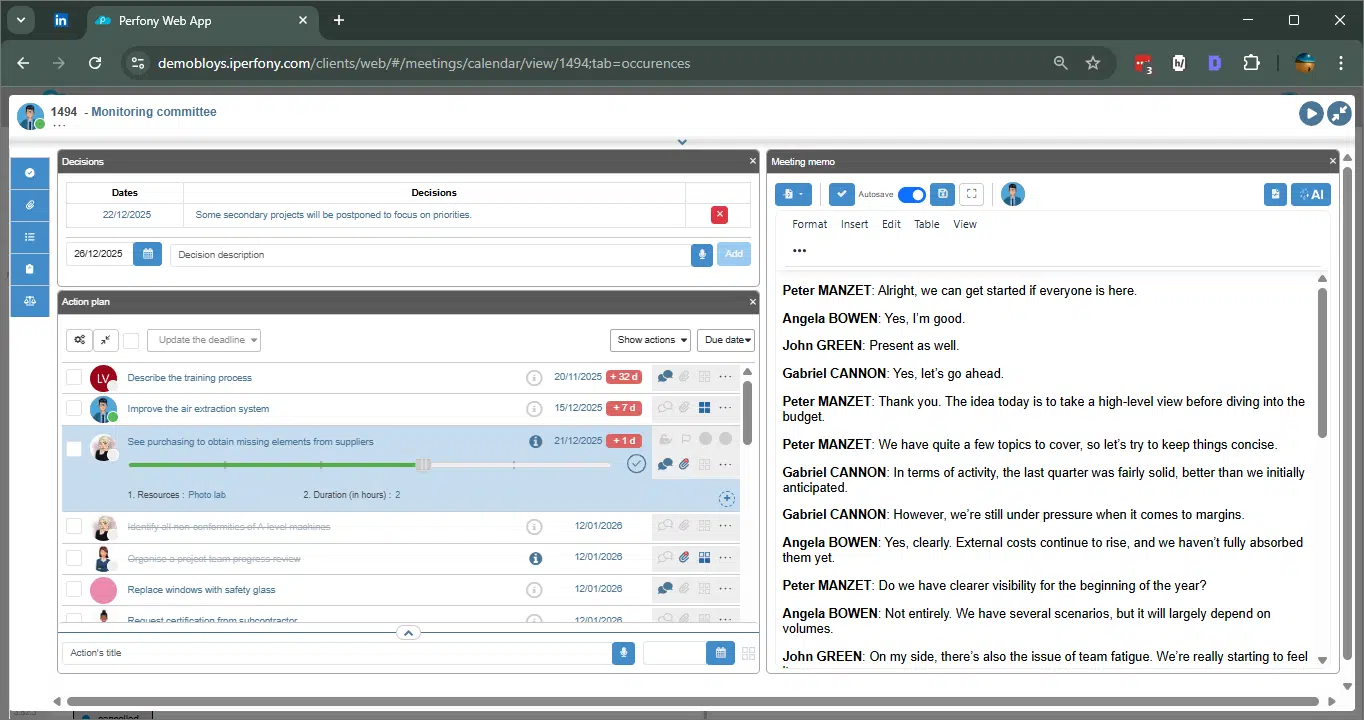
Objective: this guide shows you how to orchestrate your meetings in Perfony, leverage AI for transcription, synthesis and the creation of actions and decisions, and efficiently structure post-meeting follow-up.
Before the meeting: preparation and framing
Before you even start a meeting, careful preparation is essential to maximize efficiency and productivity.
Efficient preparation :
-
Define the issues and objectives of the meeting.
-
Identify the participants and prepare the associated action plan, if necessary.
-
Apply the RIDA method (Result, Information, Decision, Action): every element exchanged must be able to be captured and properly exploited.
-
Information corresponds to important data or facts.
-
Decisions are the choices or orientations validated during the meeting. They will be added to the record of decisions, and taken up again at the next meeting.
-
Actions are concrete tasks resulting from a decision or information.
-
-
Préparez un compte-rendu vierge dans Perfony ou vérifiez l’existant pour centraliser vos notes.
A well-prepared meeting enables the AI to generate more accurate summaries and facilitates the creation of actions and decisions right from the meeting.
During the meeting: capturing exchanges
The aim of this phase is to capture all interventions and facilitate subsequent analysis.
1. Automatic transcription
Perfony offers automatic transcription to transform speech into usable text:
-
Activate transcription from the meeting interface
-
Each voice is initially displayed as Participant 1, 2, 3… and can be linked to a real participant.
-
The transcription is visible in real time in the Transcription tab.
Import existing files :
-
VTT files (usually from Teams) or MP4 files (meeting videos) can be imported and automatically converted to transcription.
→ Learn more about automatic transcription
2. Note-taking and AI
-
You can take notes by hand or use transcriptions.
-
The IA icon is available at any time to generate the summary, whether during the meeting (status In progress) or afterwards.
Tips :
-
Let AI capture the text to reduce the cognitive load and let you concentrate on animation and decisions.
After the meeting: transforming the exchange into usable material
1. Automatic overview window
Once you have completed your notes or transcript, click on “Summary” in the meeting interface. The summary window offers four formats:
-
Simple synthesis: summary without actions or decisions.
-
RIDA: captures all information, actions and decisions.
-
Actions and decisions: lists only actions and decisions.
-
Complete summary + Actions + Decisions: overall summary, with all identified actions and decisions.
Fonctionnalités clés :
-
L’IA identifie chaque action et décision et propose de les créer directement dans Perfony.
-
For each item created, it is possible to check or modify: deadline, person responsible, origin (file), priority, description and attachment.
-
Les actions sont ajoutées au plan d’action et surlignées dans le compte-rendu.
-
Decisions are added to the record of decisions and highlighted in the minutes.
→ Find out more about automatic synthesis
→ Create and exploit decisions and actions
Academic Council :
-
The RIDA format is recommended even for simple notes. It structures the meeting and facilitates follow-up.
-
Prioritize actions that have a real impact, and review decisions before approving them.
2. Post-synthesis management
-
Close the window by clicking on “Insert”.
-
The report is displayed automatically, allowing you to :
-
Modify or complete text.
-
Adjust actions and decisions directly from the minutes.
-
Best practices :
-
Reread each action to check who’s responsible and when.
-
Use the summary to analyze the quality of the meeting and identify areas for improvement for the next session.
After the meeting: steering and continuity
-
Track actions in the action plan and integrate them into Perfony folders to centralize follow-up and automate reminders.
-
History and traceability for all decisions, to ensure operational follow-up.
Best practices for AI animation
-
Choose the right summary format to suit the type and purpose of the meeting.
-
Check allocation of actions and decisions before validation.
-
Use the wrap-up to empower participants.
-
Utiliser les fonctionnalités d’import (VTT, MP4) pour capitaliser sur des réunions passées.
Summary
Perfony covers the entire meeting cycle:
-
Automatic transcription in real time or from imported files.
-
Synthèse automatique avec différents formats (RIDA recommandé).
-
Creation and follow-up of actions and decisions in the minutes and action plan.
-
Post-meeting analysis for steering, traceability and continuous improvement.
Catégory : Meetings, AI
Tags : AI, transcription, actions, organization