
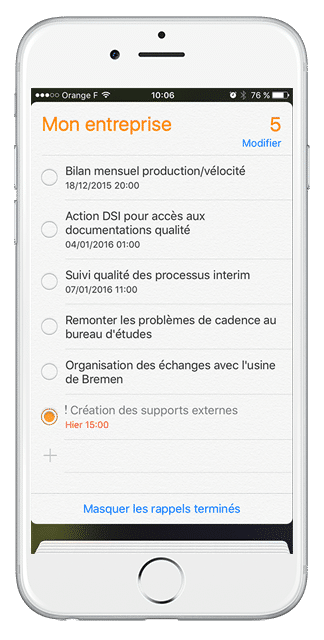
Quando você precisar saber sua disponibilidade para aceitar um compromisso, talvez não tenha seu computador à mão…
Então, como você sabe se não tem uma reunião agendada para essa hora?
Você está na oficina e quer declarar que uma de suas ações está concluída e lá novamente, talvez não haja computador acessível…
Graças a uma pequena configuração em seu iPhone, você poderá adicionar suas reuniões iPerfony em seu “calendário” e suas ações em seu aplicativo “lembrete”.

O guia em PDF em anexo leva você através das 7 etapas do processo de configuração.
Você não tem um iPhone mas usa um sistema Android ou um BlackBerry? Siga nossas novidades para encontrar muito em breve os outros arquivos detalhados de definição de parâmetros!
Mais dicas?

[/divienhancer_carouselchild][divienhancer_carouselchild identifier=”Astuce Perfony : comment “copier/coller” des actions ?” _builder_version=”4.6.6″ _module_preset=”default” use_background_color_gradient=”on” width=”100%” max_width=”25%” custom_margin=”0px|18px||0px|false|false” link_option_url=”https://www.perfony.com/fr/astuce-perfony-comment-copier-coller-des-actions/” border_radii=”on|5px|5px|5px|5px” box_shadow_style=”preset2″ box_shadow_horizontal=”10px” box_shadow_vertical=”4px” box_shadow_blur=”4px”]

[/divienhancer_carouselchild][divienhancer_carouselchild identifier=”Astuce Perfony : peut-on réouvrir des actions clôturées ou des dossiers archivés ou supprimés ?” _builder_version=”4.6.6″ _module_preset=”default” use_background_color_gradient=”on” width=”100%” max_width=”25%” custom_margin=”0px|18px||0px|false|false” link_option_url=”https://www.perfony.com/fr/astuce-perfony-peut-on-reouvrir-des-actions-cloturees-ou-des-dossiers-archives-ou-supprimes/” border_radii=”on|5px|5px|5px|5px” box_shadow_style=”preset2″ box_shadow_horizontal=”10px” box_shadow_vertical=”4px” box_shadow_blur=”4px”]

[/divienhancer_carouselchild][divienhancer_carouselchild identifier=”Astuce N°3 : la personnalisation de vos alertes mails Perfony ? C’est possible !” _builder_version=”4.6.6″ _module_preset=”default” use_background_color_gradient=”on” width=”100%” max_width=”25%” custom_margin=”0px|18px||0px|false|false” link_option_url=”https://www.perfony.com/fr/la-personnalisation-de-vos-alertes-mails-perfony-cest-possible/” border_radii=”on|5px|5px|5px|5px” box_shadow_style=”preset2″ box_shadow_horizontal=”10px” box_shadow_vertical=”4px” box_shadow_blur=”4px”]

[/divienhancer_carouselchild][divienhancer_carouselchild identifier=”Astuce N°2 : La couleur de vos dossiers” _builder_version=”4.6.6″ _module_preset=”default” use_background_color_gradient=”on” width=”100%” max_width=”25%” custom_margin=”0px|18px||0px|false|false” link_option_url=”https://www.perfony.com/fr/19196-2/” border_radii=”on|5px|5px|5px|5px” box_shadow_style=”preset2″ box_shadow_horizontal=”10px” box_shadow_vertical=”4px” box_shadow_blur=”4px”]

[/divienhancer_carouselchild][divienhancer_carouselchild identifier=”Astuce N°1 : la %22flèche expand%22″ _builder_version=”4.6.6″ _module_preset=”default” use_background_color_gradient=”on” width=”100%” max_width=”25%” custom_margin=”0px|18px||0px|false|false” link_option_url=”https://www.perfony.com/fr/19117-2/” border_radii=”on|5px|5px|5px|5px” box_shadow_style=”preset2″ box_shadow_horizontal=”10px” box_shadow_vertical=”4px” box_shadow_blur=”4px”]

[/divienhancer_carouselchild][divienhancer_carouselchild identifier=”Astuce Perfony : comment exporter des informations pour les partager” _builder_version=”4.6.6″ _module_preset=”default” use_background_color_gradient=”on” width=”100%” max_width=”25%” custom_margin=”0px|18px||0px|false|false” link_option_url=”https://www.perfony.com/fr/astuce-perfony-comment-exporter-des-informations-pour-les-partager/” border_radii=”on|5px|5px|5px|5px” box_shadow_style=”preset2″ box_shadow_horizontal=”10px” box_shadow_vertical=”4px” box_shadow_blur=”4px”]

[/divienhancer_carouselchild][/divienhancer_carousel]