
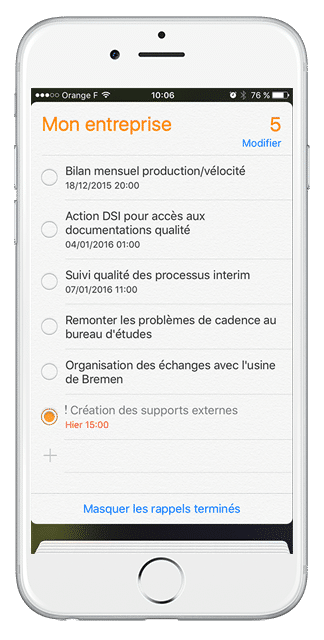
Wanneer u moet weten of u beschikbaar bent om een afspraak aan te nemen, hebt u misschien uw computer niet bij de hand…
Dus hoe weet je dat als je op dat moment geen vergadering hebt gepland?
U bent in de werkplaats en u wilt verklaren dat een van uw acties voltooid is en ook daar is misschien geen computer bereikbaar…
Dankzij een kleine instelling op je iPhone, zal je je iPerfony vergaderingen kunnen toevoegen in je “kalender” en je acties in je “herinnering” applicatie

De bijgevoegde PDF-gids leidt u door de 7 stappen van het installatieproces.
U hebt geen iPhone maar u gebruikt een Android systeem of een BlackBerry? Volg ons nieuws om zeer binnenkort de andere gedetailleerde fiches van de parameterinstelling te vinden!
Nog meer tips?

[/divienhancer_carouselchild][divienhancer_carouselchild identifier=”Astuce Perfony : comment “copier/coller” des actions ?” _builder_version=”4.6.6″ _module_preset=”default” use_background_color_gradient=”on” width=”100%” max_width=”25%” custom_margin=”0px|18px||0px|false|false” link_option_url=”https://www.perfony.com/fr/astuce-perfony-comment-copier-coller-des-actions/” border_radii=”on|5px|5px|5px|5px” box_shadow_style=”preset2″ box_shadow_horizontal=”10px” box_shadow_vertical=”4px” box_shadow_blur=”4px”]

[/divienhancer_carouselchild][divienhancer_carouselchild identifier=”Astuce Perfony : peut-on réouvrir des actions clôturées ou des dossiers archivés ou supprimés ?” _builder_version=”4.6.6″ _module_preset=”default” use_background_color_gradient=”on” width=”100%” max_width=”25%” custom_margin=”0px|18px||0px|false|false” link_option_url=”https://www.perfony.com/fr/astuce-perfony-peut-on-reouvrir-des-actions-cloturees-ou-des-dossiers-archives-ou-supprimes/” border_radii=”on|5px|5px|5px|5px” box_shadow_style=”preset2″ box_shadow_horizontal=”10px” box_shadow_vertical=”4px” box_shadow_blur=”4px”]

[/divienhancer_carouselchild][divienhancer_carouselchild identifier=”Astuce N°3 : la personnalisation de vos alertes mails Perfony ? C’est possible !” _builder_version=”4.6.6″ _module_preset=”default” use_background_color_gradient=”on” width=”100%” max_width=”25%” custom_margin=”0px|18px||0px|false|false” link_option_url=”https://www.perfony.com/fr/la-personnalisation-de-vos-alertes-mails-perfony-cest-possible/” border_radii=”on|5px|5px|5px|5px” box_shadow_style=”preset2″ box_shadow_horizontal=”10px” box_shadow_vertical=”4px” box_shadow_blur=”4px”]

[/divienhancer_carouselchild][divienhancer_carouselchild identifier=”Astuce N°2 : La couleur de vos dossiers” _builder_version=”4.6.6″ _module_preset=”default” use_background_color_gradient=”on” width=”100%” max_width=”25%” custom_margin=”0px|18px||0px|false|false” link_option_url=”https://www.perfony.com/fr/19196-2/” border_radii=”on|5px|5px|5px|5px” box_shadow_style=”preset2″ box_shadow_horizontal=”10px” box_shadow_vertical=”4px” box_shadow_blur=”4px”]

[/divienhancer_carouselchild][divienhancer_carouselchild identifier=”Astuce N°1 : la %22flèche expand%22″ _builder_version=”4.6.6″ _module_preset=”default” use_background_color_gradient=”on” width=”100%” max_width=”25%” custom_margin=”0px|18px||0px|false|false” link_option_url=”https://www.perfony.com/fr/19117-2/” border_radii=”on|5px|5px|5px|5px” box_shadow_style=”preset2″ box_shadow_horizontal=”10px” box_shadow_vertical=”4px” box_shadow_blur=”4px”]

[/divienhancer_carouselchild][divienhancer_carouselchild identifier=”Astuce Perfony : comment exporter des informations pour les partager” _builder_version=”4.6.6″ _module_preset=”default” use_background_color_gradient=”on” width=”100%” max_width=”25%” custom_margin=”0px|18px||0px|false|false” link_option_url=”https://www.perfony.com/fr/astuce-perfony-comment-exporter-des-informations-pour-les-partager/” border_radii=”on|5px|5px|5px|5px” box_shadow_style=”preset2″ box_shadow_horizontal=”10px” box_shadow_vertical=”4px” box_shadow_blur=”4px”]

[/divienhancer_carouselchild][/divienhancer_carousel]