
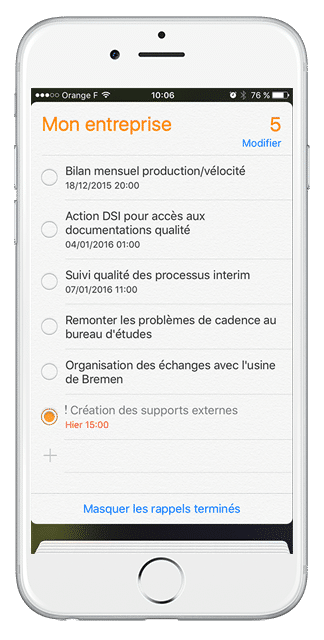
Wenn Sie Ihre Verfügbarkeit wissen müssen, um einen Termin anzunehmen, haben Sie vielleicht Ihren Computer nicht zur Hand…
Woher wissen Sie also, dass Sie zu diesem Zeitpunkt kein Meeting geplant haben?
Sie sind in der Werkstatt und wollen eine Ihrer Aktionen für beendet erklären und da ist vielleicht wieder kein Computer zugänglich…
Dank einer kleinen Einstellung auf Ihrem iPhone können Sie Ihre iPerfony-Besprechungen in Ihrem „Kalender“ und Ihre Aktionen in Ihrer „Erinnerungs“-Anwendung hinzufügen

Die beigefügte PDF-Anleitung führt Sie durch die 7 Schritte des Einrichtungsvorgangs.
Sie haben kein iPhone, nutzen aber ein Android-System oder einen BlackBerry? Verfolgen Sie unsere News, um sehr bald die weiteren detaillierten Blätter der Parametrierung zu finden!
Weitere Tipps?

[/divienhancer_carouselchild][divienhancer_carouselchild identifier=“Astuce Perfony : comment “copier/coller” des actions ?“ _builder_version=“4.6.6″ _module_preset=“default“ use_background_color_gradient=“on“ width=“100%“ max_width=“25%“ custom_margin=“0px|18px||0px|false|false“ link_option_url=“https://www.perfony.com/fr/astuce-perfony-comment-copier-coller-des-actions/“ border_radii=“on|5px|5px|5px|5px“ box_shadow_style=“preset2″ box_shadow_horizontal=“10px“ box_shadow_vertical=“4px“ box_shadow_blur=“4px“]

[/divienhancer_carouselchild][divienhancer_carouselchild identifier=“Astuce Perfony : peut-on réouvrir des actions clôturées ou des dossiers archivés ou supprimés ?“ _builder_version=“4.6.6″ _module_preset=“default“ use_background_color_gradient=“on“ width=“100%“ max_width=“25%“ custom_margin=“0px|18px||0px|false|false“ link_option_url=“https://www.perfony.com/fr/astuce-perfony-peut-on-reouvrir-des-actions-cloturees-ou-des-dossiers-archives-ou-supprimes/“ border_radii=“on|5px|5px|5px|5px“ box_shadow_style=“preset2″ box_shadow_horizontal=“10px“ box_shadow_vertical=“4px“ box_shadow_blur=“4px“]

[/divienhancer_carouselchild][divienhancer_carouselchild identifier=“Astuce N°3 : la personnalisation de vos alertes mails Perfony ? C’est possible !“ _builder_version=“4.6.6″ _module_preset=“default“ use_background_color_gradient=“on“ width=“100%“ max_width=“25%“ custom_margin=“0px|18px||0px|false|false“ link_option_url=“https://www.perfony.com/fr/la-personnalisation-de-vos-alertes-mails-perfony-cest-possible/“ border_radii=“on|5px|5px|5px|5px“ box_shadow_style=“preset2″ box_shadow_horizontal=“10px“ box_shadow_vertical=“4px“ box_shadow_blur=“4px“]

[/divienhancer_carouselchild][divienhancer_carouselchild identifier=“Astuce N°2 : La couleur de vos dossiers“ _builder_version=“4.6.6″ _module_preset=“default“ use_background_color_gradient=“on“ width=“100%“ max_width=“25%“ custom_margin=“0px|18px||0px|false|false“ link_option_url=“https://www.perfony.com/fr/19196-2/“ border_radii=“on|5px|5px|5px|5px“ box_shadow_style=“preset2″ box_shadow_horizontal=“10px“ box_shadow_vertical=“4px“ box_shadow_blur=“4px“]

[/divienhancer_carouselchild][divienhancer_carouselchild identifier=“Astuce N°1 : la %22flèche expand%22″ _builder_version=“4.6.6″ _module_preset=“default“ use_background_color_gradient=“on“ width=“100%“ max_width=“25%“ custom_margin=“0px|18px||0px|false|false“ link_option_url=“https://www.perfony.com/fr/19117-2/“ border_radii=“on|5px|5px|5px|5px“ box_shadow_style=“preset2″ box_shadow_horizontal=“10px“ box_shadow_vertical=“4px“ box_shadow_blur=“4px“]

[/divienhancer_carouselchild][divienhancer_carouselchild identifier=“Astuce Perfony : comment exporter des informations pour les partager“ _builder_version=“4.6.6″ _module_preset=“default“ use_background_color_gradient=“on“ width=“100%“ max_width=“25%“ custom_margin=“0px|18px||0px|false|false“ link_option_url=“https://www.perfony.com/fr/astuce-perfony-comment-exporter-des-informations-pour-les-partager/“ border_radii=“on|5px|5px|5px|5px“ box_shadow_style=“preset2″ box_shadow_horizontal=“10px“ box_shadow_vertical=“4px“ box_shadow_blur=“4px“]

[/divienhancer_carouselchild][/divienhancer_carousel]