
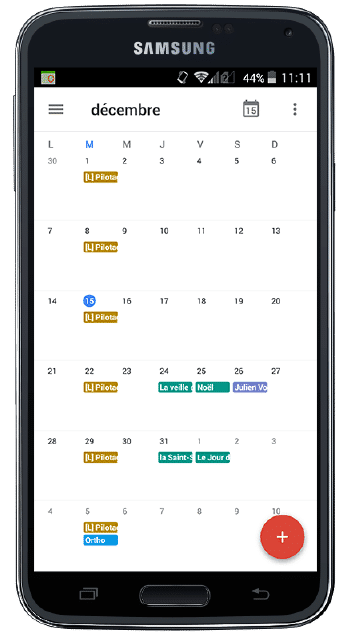
Um einen Termin zu vereinbaren, ist es wichtig, dass Sie Ihren Kalender auf dem neuesten Stand halten. Daher ist es unerlässlich, dass Sie Ihre Perfony-Meetings in dem Kalender anzeigen können, den Sie am häufigsten verwenden: dem auf Ihrem Smartphone.

So synchronisieren Sie Perfony mit Androïd
Für Ihr Samsung oder LG, oder jedes andere Smartphone, das auf Android läuft, ist es extrem einfach und Sie können diesen Vorgang in weniger als 2 Minuten durchführen, indem Sie der „Schritt-für-Schritt“-Anleitung folgen, die zum Download zur Verfügung steht… und natürlich ist sie kostenlos.
PS: für iPhone-Benutzer, finden Sie hier das iOS-Synchronisationsverfahren.
Weitere Tipps?

[/divienhancer_carouselchild][divienhancer_carouselchild identifier=“Astuce Perfony : comment “copier/coller” des actions ?“ _builder_version=“4.6.6″ _module_preset=“default“ use_background_color_gradient=“on“ width=“100%“ max_width=“25%“ custom_margin=“0px|18px||0px|false|false“ link_option_url=“https://www.perfony.com/fr/astuce-perfony-comment-copier-coller-des-actions/“ border_radii=“on|5px|5px|5px|5px“ box_shadow_style=“preset2″ box_shadow_horizontal=“10px“ box_shadow_vertical=“4px“ box_shadow_blur=“4px“]

[/divienhancer_carouselchild][divienhancer_carouselchild identifier=“Astuce Perfony : peut-on réouvrir des actions clôturées ou des dossiers archivés ou supprimés ?“ _builder_version=“4.6.6″ _module_preset=“default“ use_background_color_gradient=“on“ width=“100%“ max_width=“25%“ custom_margin=“0px|18px||0px|false|false“ link_option_url=“https://www.perfony.com/fr/astuce-perfony-peut-on-reouvrir-des-actions-cloturees-ou-des-dossiers-archives-ou-supprimes/“ border_radii=“on|5px|5px|5px|5px“ box_shadow_style=“preset2″ box_shadow_horizontal=“10px“ box_shadow_vertical=“4px“ box_shadow_blur=“4px“]

[/divienhancer_carouselchild][divienhancer_carouselchild identifier=“Astuce N°3 : la personnalisation de vos alertes mails Perfony ? C’est possible !“ _builder_version=“4.6.6″ _module_preset=“default“ use_background_color_gradient=“on“ width=“100%“ max_width=“25%“ custom_margin=“0px|18px||0px|false|false“ link_option_url=“https://www.perfony.com/fr/la-personnalisation-de-vos-alertes-mails-perfony-cest-possible/“ border_radii=“on|5px|5px|5px|5px“ box_shadow_style=“preset2″ box_shadow_horizontal=“10px“ box_shadow_vertical=“4px“ box_shadow_blur=“4px“]

[/divienhancer_carouselchild][divienhancer_carouselchild identifier=“Astuce N°2 : La couleur de vos dossiers“ _builder_version=“4.6.6″ _module_preset=“default“ use_background_color_gradient=“on“ width=“100%“ max_width=“25%“ custom_margin=“0px|18px||0px|false|false“ link_option_url=“https://www.perfony.com/fr/19196-2/“ border_radii=“on|5px|5px|5px|5px“ box_shadow_style=“preset2″ box_shadow_horizontal=“10px“ box_shadow_vertical=“4px“ box_shadow_blur=“4px“]

[/divienhancer_carouselchild][divienhancer_carouselchild identifier=“Astuce N°1 : la %22flèche expand%22″ _builder_version=“4.6.6″ _module_preset=“default“ use_background_color_gradient=“on“ width=“100%“ max_width=“25%“ custom_margin=“0px|18px||0px|false|false“ link_option_url=“https://www.perfony.com/fr/19117-2/“ border_radii=“on|5px|5px|5px|5px“ box_shadow_style=“preset2″ box_shadow_horizontal=“10px“ box_shadow_vertical=“4px“ box_shadow_blur=“4px“]

[/divienhancer_carouselchild][divienhancer_carouselchild identifier=“Astuce Perfony : comment exporter des informations pour les partager“ _builder_version=“4.6.6″ _module_preset=“default“ use_background_color_gradient=“on“ width=“100%“ max_width=“25%“ custom_margin=“0px|18px||0px|false|false“ link_option_url=“https://www.perfony.com/fr/astuce-perfony-comment-exporter-des-informations-pour-les-partager/“ border_radii=“on|5px|5px|5px|5px“ box_shadow_style=“preset2″ box_shadow_horizontal=“10px“ box_shadow_vertical=“4px“ box_shadow_blur=“4px“]

[/divienhancer_carouselchild][/divienhancer_carousel]