
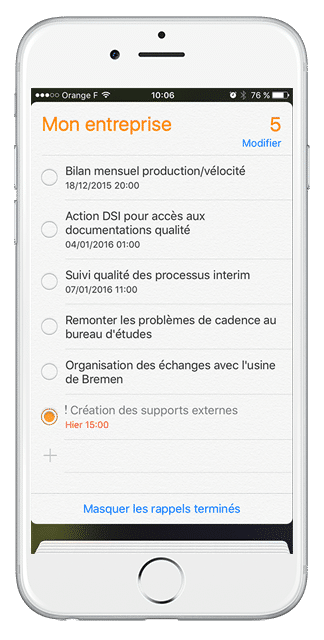
Quando hai bisogno di sapere la tua disponibilità per accettare un appuntamento, potresti non avere il tuo computer a portata di mano…
Quindi come si fa a sapere se non si ha una riunione in programma a quell’ora?
Siete nell’officina e volete dichiarare che una delle vostre azioni è terminata e ancora una volta, forse non c’è un computer accessibile…
Grazie a una piccola impostazione sul vostro iPhone, sarete in grado di aggiungere le vostre riunioni iPerfony nel vostro “calendario” e le vostre azioni nella vostra applicazione “promemoria”.

La guida PDF allegata ti porta attraverso i 7 passi del processo di configurazione.
Non hai un iPhone ma usi un sistema Android o un BlackBerry? Seguite le nostre notizie per trovare molto presto gli altri file dettagliati di impostazione dei parametri!
Altri consigli?

[/divienhancer_carouselchild][divienhancer_carouselchild identifier=”Astuce Perfony : comment “copier/coller” des actions ?” _builder_version=”4.6.6″ _module_preset=”default” use_background_color_gradient=”on” width=”100%” max_width=”25%” custom_margin=”0px|18px||0px|false|false” link_option_url=”https://www.perfony.com/fr/astuce-perfony-comment-copier-coller-des-actions/” border_radii=”on|5px|5px|5px|5px” box_shadow_style=”preset2″ box_shadow_horizontal=”10px” box_shadow_vertical=”4px” box_shadow_blur=”4px”]

[/divienhancer_carouselchild][divienhancer_carouselchild identifier=”Astuce Perfony : peut-on réouvrir des actions clôturées ou des dossiers archivés ou supprimés ?” _builder_version=”4.6.6″ _module_preset=”default” use_background_color_gradient=”on” width=”100%” max_width=”25%” custom_margin=”0px|18px||0px|false|false” link_option_url=”https://www.perfony.com/fr/astuce-perfony-peut-on-reouvrir-des-actions-cloturees-ou-des-dossiers-archives-ou-supprimes/” border_radii=”on|5px|5px|5px|5px” box_shadow_style=”preset2″ box_shadow_horizontal=”10px” box_shadow_vertical=”4px” box_shadow_blur=”4px”]

[/divienhancer_carouselchild][divienhancer_carouselchild identifier=”Astuce N°3 : la personnalisation de vos alertes mails Perfony ? C’est possible !” _builder_version=”4.6.6″ _module_preset=”default” use_background_color_gradient=”on” width=”100%” max_width=”25%” custom_margin=”0px|18px||0px|false|false” link_option_url=”https://www.perfony.com/fr/la-personnalisation-de-vos-alertes-mails-perfony-cest-possible/” border_radii=”on|5px|5px|5px|5px” box_shadow_style=”preset2″ box_shadow_horizontal=”10px” box_shadow_vertical=”4px” box_shadow_blur=”4px”]

[/divienhancer_carouselchild][divienhancer_carouselchild identifier=”Astuce N°2 : La couleur de vos dossiers” _builder_version=”4.6.6″ _module_preset=”default” use_background_color_gradient=”on” width=”100%” max_width=”25%” custom_margin=”0px|18px||0px|false|false” link_option_url=”https://www.perfony.com/fr/19196-2/” border_radii=”on|5px|5px|5px|5px” box_shadow_style=”preset2″ box_shadow_horizontal=”10px” box_shadow_vertical=”4px” box_shadow_blur=”4px”]

[/divienhancer_carouselchild][divienhancer_carouselchild identifier=”Astuce N°1 : la %22flèche expand%22″ _builder_version=”4.6.6″ _module_preset=”default” use_background_color_gradient=”on” width=”100%” max_width=”25%” custom_margin=”0px|18px||0px|false|false” link_option_url=”https://www.perfony.com/fr/19117-2/” border_radii=”on|5px|5px|5px|5px” box_shadow_style=”preset2″ box_shadow_horizontal=”10px” box_shadow_vertical=”4px” box_shadow_blur=”4px”]

[/divienhancer_carouselchild][divienhancer_carouselchild identifier=”Astuce Perfony : comment exporter des informations pour les partager” _builder_version=”4.6.6″ _module_preset=”default” use_background_color_gradient=”on” width=”100%” max_width=”25%” custom_margin=”0px|18px||0px|false|false” link_option_url=”https://www.perfony.com/fr/astuce-perfony-comment-exporter-des-informations-pour-les-partager/” border_radii=”on|5px|5px|5px|5px” box_shadow_style=”preset2″ box_shadow_horizontal=”10px” box_shadow_vertical=”4px” box_shadow_blur=”4px”]

[/divienhancer_carouselchild][/divienhancer_carousel]